Exchange 2003 Server - Recovery Options
Exchange 2003 Server - Recovery Options
Horror of horrors, you lose Exchange data. Perhaps it's because of hardware failure, or maybe a natural disaster, in any event the email is lost. So now it's game on and the 'recovery ball' is snapped into your hands. Just as a quarterback reads his pass routes, so you work your way through a progression of recovery options.
- 0) Initial Evaluation
- 1) Recover to the same Exchange 2003 server
- 1a) Restore the Windows Server 2003 System State first
- 2) Rebuild a new server
- Use the setup /DisasterRecovery switch.
- 2a) Standby server
0) Initial Evaluation
Investigate the scope of the problem, what Exchange 2003 data must be recovered? A piece of email, a whole Storage Group or a public folder. Do you need to restore the Windows 2003 System State? Is there any hardware which must be replaced?
Check what can be replicated from other servers. For example, Active Directory information or Public folder replicas.
Let us assume that the problem is greater than just restoring a deleted item, or reconnecting a mailbox. The solution requires either the repair of the existing server, or building a new server. Before attempting a repair, ask yourself, 'Should I backup the Exchange 2003 server as it now?'
1) Recover to the same Exchange 2003 server
Some people buy a whole new tap assembly when all they need is a new washer. Don't rebuild a whole server if you only need to restore one mailstore.
Restoring a backup copy of a mailstore database to the same server would be my first recovery choice. I see this method as being the quickest and easiest way of recovering a mailstore database. Even if you have lost the whole Storage Group, you could restore it from the backup tapes. The key to this restore method succeeding is, that apart from the Exchange databases, there is nothing else wrong with the Windows 2003 Server.
1a) Restore the Windows Server 2003 system state
If there is a hardware problem, or a stop error with the underlying Windows Server 2003, then your tactic is to carryout a System State restore. Naturally, you would replace any damaged hardware first. This is what a system state backup contains:
- The Windows Server 2003 registry
- Windows Server 2003 boot files
- Windows Server 2003 protected operating system files
- The Windows Server 2003 IIS metabase
- COM+ Class registration database
- Certificate Services database (if the server is a certificate server)
- Active Directory directory service (if the server is a domain controller)
- The SYSVOL directory (if the server is a domain controller)
- Domain Name Service (DNS) zone information (if the server is running DNS)
- Cluster service resource registry checkpoints and the quorum disk resource data (if the server is running the Cluster service)
Note: System State Backups are only good for 60 days because of tombstoning. See more on tombstoneLifetime.
 Remember that you could start the Windows 2003 Server in Safe Mode, or failing that from the Recovery Console.
2) Rebuild a new server
In this scenario the original server has been stolen or damaged beyond repair. For example a 'blue screen of death', with accompanying stop error. Your solution now is to build the server from scratch starting with Windows Server 2003.
The key steps for this strategy are to install Windows Server 2003 with a new name and in its own workgroup. Rely on restoring the system state to give the server the correct NetBIOS name and Active Directory membership.
If the decision is close whether to restore the original server from backup, or whether to build a new server, favour a fresh build as you get cleaner versions of Exchange and Windows 2003.
/DisasterRecovery
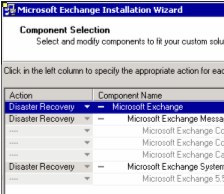
Once the new Windows Server 2003 is up and running, install Exchange 2003 with a special switch. Setup /DisasterRecovery tells the operating system not to mount the Exchange 2003 stores on boot-up. The idea is that you will then restore the databases from backup. Without this switch Exchange 2003 would mount the database and they would be live which could make the problem worse if you were trying to recover a server from backup. The DisasterRecovery switch is equivalent of ticking the 'Do not mount the store at start-up' check box on the Database tab of the store properties.
The other benefit of /DisasterRecovery is that it interrogates Active Directory for information about the Exchange Organization.
Note: There is a double rr in this switch DisasterRecovery.
2a) Standby Server
If you can persuade the financial director to spend the money then a standby server is a great solution. Not only will it give you the fastest Exchange 2003 recovery, but it will also allow you to test restores to prove that they will recover from a disaster.
Summary
If you need to recover a mailbox database work your way through a progression: Mailbox Recovery, Repair the existing server, rebuild a new server then restore from tape. Twist your financial director's arm and buy a standby server - it will give both of you peace of mind.