Office_o365-ps
Exchange 365 Admin
https://outlook.office365.com/ecp/
Exchange WebMail
https://outlook.office365.com/
https://outlook.office.com/mail/inbox
Connect to https://aka.ms/MFASetup
Or login to https://www.office.com
1. Connecting to an Office 365 instance with PowerShell
2. Connecting to Exchange Online and SharePoint Online with PowerShell
3. Getting a list of available Office 365 PowerShell cmdlets
4. Getting a list of all Office 365 users with PowerShell
If you need to provide a list of Office 365 users and licenses, use the Get-MsolUser cmdlet. It’ll retrieve all users with a valid license in the Office 365 tenant, along with the DisplayName, City, Department and ObjectID parameters.
Get-MsolUser | Select DisplayName, City, Department, ObjectID
To see the number of account licenses, you need to run the following cmdlet:
Get-MsolAccountSku
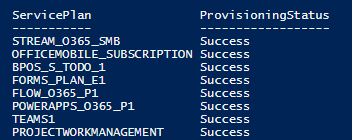
To list the available services, run the following script:
Get-MsolAccountSku | select -ExpandProperty ServiceStatus
5. Creating a new user in Office 365 with PowerShell :
To create a new user, we use the New-MsolUser command:
New-MsolUser -UserPrincipalName JSmith@enterprise.onmicrosoft.com -DisplayName "John Smith" -FirstName “John” -LastName “Smith”