Replication Monitor - AD
Replication Monitor
Use REPLMON to query and control replication and to view the location of the FSMO roles as shown in the following dialogs.
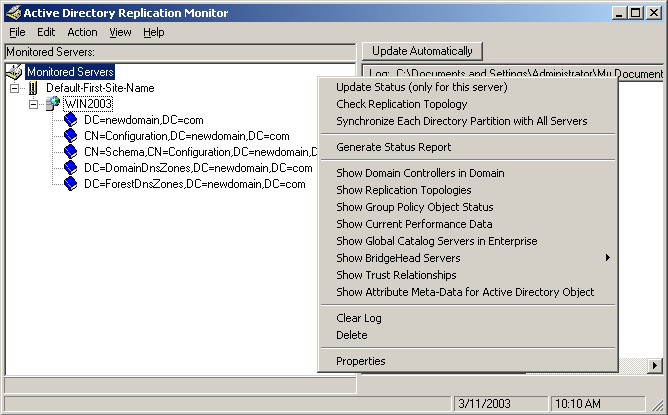
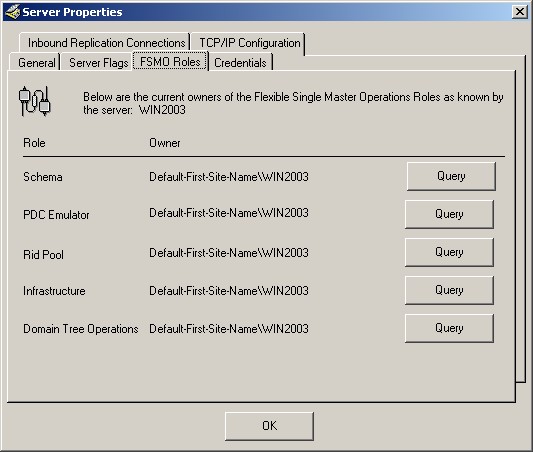
REPADMIN is a command line utility which provides replication status information. For example, use the showutdvec option to display the highest USN on a server.
C:\>repadmin /showutdvec . dc=newdomain,dc=com
repadmin running command /showutdvec against server localhost Caching GUIDs.
Default-First-Site-Name\WIN2003 @ USN 16433 @ Time 2003-04-23 20:11:44
REPADMIN has many other functions. See the Replication section for an example of the showmeta parameter. Entering REPADMIN with no options provides the following help information.
Usage: repadmin <cmd> <args> [/u:{domain\\user}] [/pw:{password|*}]
[/rpc] [/ldap] [/csv] - see /csvhelp
Supported <cmd>s & args:
/bind [DC_LIST]
/bridgeheads [DC_LIST] [/verbose]
/checkprop [DC_LIST from which to enumerate host DCs] <Naming Context>
<Originating DC Invocation ID> <Originating USN>
/dsaguid [DC_LIST] [GUID]
/failcache [DC_LIST]
/istg [DC_LIST] [/verbose]
/kcc [DC_LIST] [/async]
/latency [DC_LIST] [/verbose]
/notifyopt [DC_LIST] <Naming Context> [/first:<value>] [/subs:<value>]
/queue [DC_LIST]
/querysites <From-Site-RDN> <To-Site-RDN-1> [<To-Site-RDN-2> ...]
(may not be called with alternate credentials)
/replicate <Dest_DC_LIST> <Naming Context> /allsources [/force] [/async]
[/full] [/addref] [/readonly]
/replicate <Dest_DC_LIST> <Source DC_NAME> <Naming Context> [/force] [/async]
[/full] [/addref] [/readonly]
/replsingleobj <DC_LIST> <dsa-source-guid> <obj dn>
/replsummary [DC_LIST] /bysrc /bydest /errorsonly
[/sort:{ delta | partners | failures | error | percent | unresponsive }]
/showattr <DC_LIST> <OBJ_LIST> [OBJ_LIST OPTIONS]
[/atts:<att1>,<att2>...] [/allvalues] [/long] [/dumpallblob]
/showcert [DC_LIST]
/showchanges . <SourceDC> <NamingContext> [/cookie:<file>]
[/atts:<att1>,<att2>,...] [/long] [
/showchanges <Dest_DC_LIST> <SourceDCObjectGUID> <NamingContext>
[/verbose] [/statistics] [/noincremental] [/objectsecurity]
[/ancestors] [/atts:<att1>,<att2>,...] [/filter:<ldap filter>]
/showconn [DC_LIST] {serverRDN | Container DN | <DC GUID>} (default is local site)
[/from:serverRDN] [/intersite]
/showctx [DC_LIST] [/nocache]
/showism [<Transport DN>] [/verbose] (must be executed locally)
/showmsg {<Win32 error> | <DS event ID> /NTDSMSG}
/showncsig [DC_LIST]
/showobjmeta [DC_LIST] <Object DN> [/nocache] [/linked]
/showoutcalls [DC_LIST]
/showproxy [DC_LIST] [Naming Context] [matchstring] (search xdommove proxies)
/showproxy [DC_LIST] [Object DN] [matchstring] /movedobject (dump xdommoved object)
/showrepl [DC_LIST [Source DC object GUID]] [Naming Context] [/verbose]
[/nocache] [/repsto] [/conn] [/all] [/errorsonly] [/intersite]
/showsig [DC_LIST]
/showtime <DS time value>
/showtrust [DC_LIST]
/showutdvec <DC_LIST> <Naming Context> [/nocache] [/latency]
/showvalue [DC_LIST] <Object DN> [Attribute Name] [Value DN] [/nocache]
/syncall <DC> [<Naming Context>] [<flags>]
/viewlist <DC_LIST> [OBJ_LIST]
Note: Most commands take their parameters in the order of "Destination or Target DC_LIST",
then a "Soure DC_NAME" if required, and finally the NC or Object DN if required.
DC_LIST or DC_NAME is the proper DNS or NetBios name of a DC, for more options see
repadmin /listhelp.
<Dest DC>, <Source DC>, <DC> : Names of the appropriate servers <Naming Context> is the Distinguished Name of the root of the NC
Example: DC=My-Domain,DC=Microsoft,DC=Com
Note: Text (Naming Context names, server names, etc) with International or Unicode characters will only display correctly if appropriate fonts and language support are loaded
Deprecated Commands: use repadmin /oldhelp to see these deprecated commands' syntaxes.
/sync /propcheck /getchanges /getchanges /showreps /showvector /showmeta